Businesses in ChatGPT and how to add your business
On this page
Businesses in ChatGPT is OpenAI’s program for claiming a business profile that ChatGPT can draw on in its answers. To add a business to ChatGPT, the owner claims its profile in Business Hub, verifies ownership and fills in a category, a description, contact details and store policies. OpenAI then reports how often ChatGPT mentions the business and how many people click through to its site.
As of November 10, 2026, online stores can complete a profile. Local and service businesses wait for their paths to open.
Businesses in ChatGPT is a separate product from ChatGPT Business, OpenAI’s paid workplace plan.
| Company | OpenAI |
|---|---|
| Launched | November 10, 2026, in beta |
| Cost | Free during the beta |
| Where to start | Business Hub, at chatgpt.com/business-hub |
| Who can claim | Eligible businesses located where ChatGPT is available. US local businesses can claim only existing listings. |
| Paths open | Online store. Physical locations join a waitlist, and the service path is marked coming soon. |
| Verification | DNS TXT record, a code to the business phone or email, or a Shopify login |
| Profile fields | Website, category, description, phone, email, logo, cover photo, delivery policy and return policy |
| Data reported | Mentions, profile views, website clicks and discovery topics |
| Data withheld | Prompts, conversations and share of voice |
| Business Agents | Eligible ecommerce and online service businesses in the US |
| Paid version | Sponsored Agents, in testing since September 2026 |
OpenAI launched Businesses in ChatGPT in beta
OpenAI launched Businesses in ChatGPT in beta on November 10, 2026 (OpenAI’s announcement). TechCrunch’s launch coverage compared it with Google’s business profiles.
Business Hub is the dashboard at chatgpt.com/business-hub where a business claims its profile, verifies that it owns it and edits what ChatGPT can share (OpenAI community post). OpenAI reviews the profile and later edits before they go live. The Insights area holds the reporting.
Business Agents are assistants a business builds inside ChatGPT from its own instructions and product feed. OpenAI limits them to eligible ecommerce and online service businesses in the US during the beta (Search Engine Roundtable’s launch report).
Any business located where ChatGPT is available can try to claim a profile. OpenAI decides eligibility by industry, location and its own verification checks (citeme’s test of the setup flow). In the US, a local business can claim only a listing ChatGPT already has (Flavio Copes’s walkthrough). A business doesn’t need Shopify, a ChatGPT Enterprise plan or an ads account to take part.
Adding a business to ChatGPT is free during the beta. Benji Shomair, OpenAI’s VP of monetization, didn’t rule out a paid model later (Digiday’s report on Business Agents). OpenAI began testing a paid version of the Business Agent, called a Sponsored Agent, in September 2026.
Business Hub gives businesses first-party data
Business Hub gives businesses OpenAI’s own counts of how they appear in ChatGPT. That makes it for a channel that had none.
Before Business Hub, a business could see ChatGPT referrals in its own analytics. Third-party tools estimate the rest by sending sample prompts to ChatGPT and recording the answers. Business Hub counts mentions and clicks on supported ChatGPT surfaces, within the privacy limits OpenAI sets.
What data does Business Hub report?
Business Hub reports mentions, profile views, website clicks and discovery topics in its Insights area.
| Measure | What it counts |
|---|---|
| Mentions | Times ChatGPT showed the business as a result or referenced its website |
| Profile views | Views of the business profile, as Business Hub reports them |
| Website clicks | Clicks on links to the business’s site from supported ChatGPT surfaces |
| Discovery topics | Common themes in conversations where the site was cited |
The click tooltip in Business Hub says clicks don’t confirm website visits or conversions. To see what the clicks turned into, compare them with visits that arrive from chatgpt.com in your analytics. How do you measure AEO? covers setting up AI referral tracking in GA4.
What counts as a mention in ChatGPT?
A mention counts when ChatGPT shows a result for a local business’s location or references an online business’s website, Digiday reports. An OpenAI spokesperson told Digiday that naming the brand alone doesn’t count.
Third-party trackers count those brand-only mentions and sample their own prompts. Their totals can differ from Business Hub’s for the same period.
What does Business Hub leave out?
Business Hub leaves out the prompts and conversations behind each mention. OpenAI says it doesn’t share users’ conversations or Business Agent chats with businesses.
Share of voice, a business’s share of mentions against competitors, isn’t part of the beta. Low counts can be withheld for privacy, an OpenAI spokesperson told Digiday. New or small profiles can show blank charts until they pass a reporting threshold, so a blank chart can hide real mentions.
A ChatGPT business profile adds to AEO work
A ChatGPT business profile gives search teams a place to state the facts a business wants ChatGPT to share. work on ChatGPT has mostly meant improving the website and how other sites describe the business. The profile adds an input the business edits directly.
ChatGPT search reads a business’s website through OAI-SearchBot, the OpenAI uses for search. OpenAI says sites that block OAI-SearchBot won’t be shown in ChatGPT search answers, though they can appear as navigational links (OpenAI’s crawler documentation).
Does a claimed profile rank higher in ChatGPT?
A claimed profile doesn’t rank higher in ChatGPT on its own. Shomair told Digiday that claiming “should not have an impact on how frequently it appears.” He added that the details a business supplies could help ChatGPT bring it up in more relevant conversations.
How often a business comes up depends on its own pages and on mentions elsewhere, which the Answer Engine Optimization (AEO) guide covers.
What should SEO teams do about ChatGPT business profiles?
teams should claim the profile early, keep it consistent with the website and watch the new numbers against their own analytics. Barry Schwartz of Search Engine Roundtable pointed to the risk of someone else claiming a business’s profile first.
- Check that allows OAI-SearchBot. What are GPTBot, OAI-SearchBot and ChatGPT-User? explains what each OpenAI bot does.
- Match the category, description, phone, email and policies to what the website says.
- Publish delivery and return terms on a page crawlers can reach.
- Record a baseline of chatgpt.com referrals in analytics before the profile goes live.
- Review the discovery topics each month for themes your site doesn’t answer yet.
What should a business check before claiming a profile?
A business should check its details and decide who owns the account before claiming a profile. OpenAI support can’t delete or unpublish a published profile, and only drafts can be removed, according to Flavio Copes’s walkthrough. The identity check that follows can ask for a government ID, business registration and proof of authorization.
Business Hub works like Google Business Profile
Business Hub works much like Google Business Profile. Both let an owner claim a listing, prove they run it and edit the details the platform shows. Google reports on and in , a separate tool from Google Business Profile.
How is a ChatGPT business profile different from Google Business Profile?
A ChatGPT business profile holds fewer details than a Google Business Profile, and the business picks its own verification method.
| ChatGPT business profile | Google Business Profile | |
|---|---|---|
| Verification | DNS TXT record, phone or email code, or Shopify login | Phone or text, email, video recording, live video call or postcard |
| Who picks the method | OpenAI shows the methods that apply, and the business picks one | |
| Fields at launch | Category, description, contact details, logo, cover photo, delivery and return policies | Hours, phone, description and more |
Google’s help page says verification methods are set by Google and can’t be changed (Google’s verification help).
How does Business Hub compare with Search Console’s AI reporting?
Business Hub reports mentions, profile views and website clicks from ChatGPT. Search Console’s generative AI report counts impressions, and Bing’s counts citations.
| ChatGPT Business Hub | Google Search Console | Bing Webmaster Tools | |
|---|---|---|---|
| AI reporting | Mentions, profile views, website clicks, discovery topics | Impressions in AI Overviews, AI Mode and Discover | Citations, cited pages and grounding queries |
| Clicks from AI answers | Reported | Included in Web search totals | No click measure listed |
| Prompts or queries | Withheld | No query breakdown listed | Sampled grounding queries |
| What it counts | The business | URLs | URLs |
| Reporting since | November 10, 2026 | August 31, 2026, for all sites | February 10, 2026, in preview |
Google finished rolling its report out to all sites on August 31, 2026 (Google’s announcement of the generative AI report). Bing’s AI Performance report counts citations in Copilot and Bing’s AI summaries (Bing’s AI Performance announcement). Business Hub is the only one of the three that reports clicks from AI answers on their own.
Each ChatGPT business profile takes one category
Each ChatGPT business profile takes one category from a single dropdown. The menu held 848 categories as of November 10, 2026, running from AI company to Zoo. Filter the list below to find the closest match before you start.
The 848 categories in the setup menu as of November 10, 2026.
How do you choose a business category in ChatGPT?
Choose the most specific category that names what a customer buys from you. A business that sells candles online fits “Home goods store” or “Gift shop” better than “Online media company”.
ChatGPT suggests categories after you type a description in the optional description box. Write the description first, then check the suggestions against the list above.
Set up an online store profile in ChatGPT
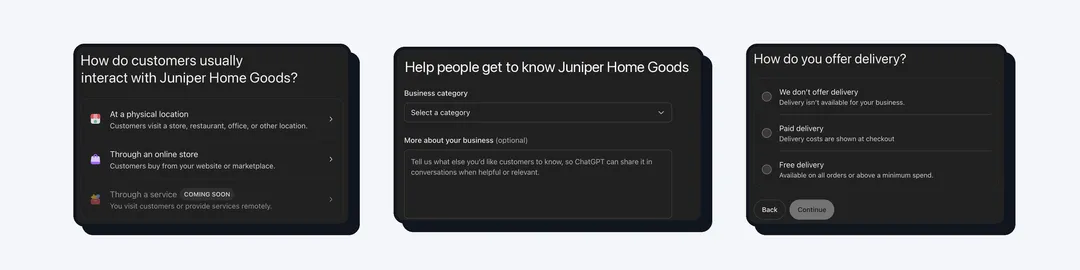
An online store profile in ChatGPT takes seven steps. A published profile can’t be deleted, so check the details before you submit. The screenshots use a made-up store, Juniper Home Goods, at example.com.
-
Open Business Hub. Sign in with the ChatGPT account that will manage the profile, search for the business and claim it. An eligible online business may get the option to add a new listing.
-
Choose “Through an online store”. This is the path for businesses whose customers buy from a website or a marketplace.
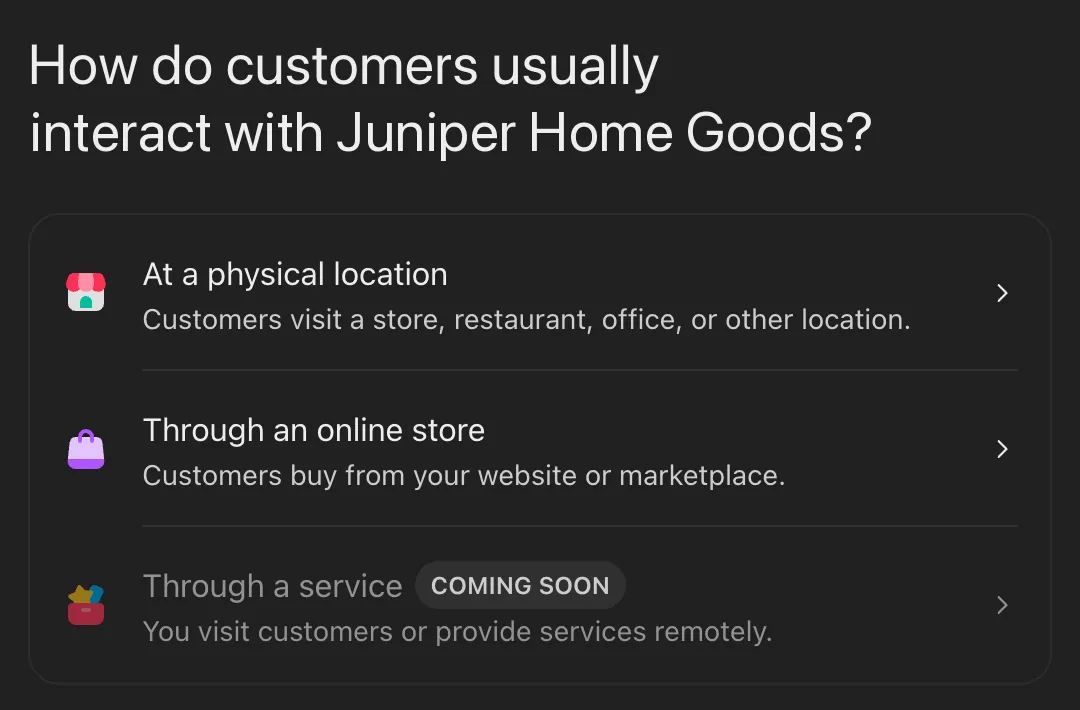
The service option was marked coming soon on November 10, 2026. -
Enter the business website. ChatGPT asks you to verify this domain next.
-
Verify the domain. Add the ChatGPT shows to the domain’s DNS settings, then select the check button. DNS settings live with the company that runs the domain, often the registrar or a service such as Cloudflare. If you can’t edit DNS, use the phone, email or Shopify option.
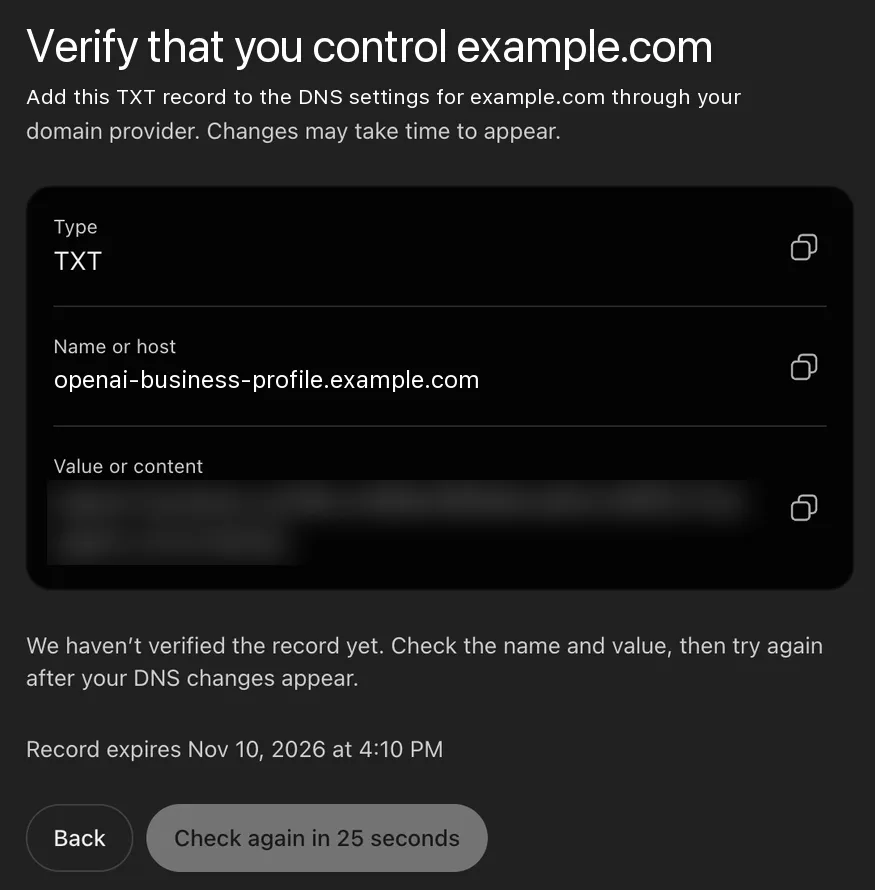
The screen lists an expiry time for the record and a button that checks for it again. -
Pick a category and write a description. Name the products, who they’re for and where you ship, using facts the website also states.
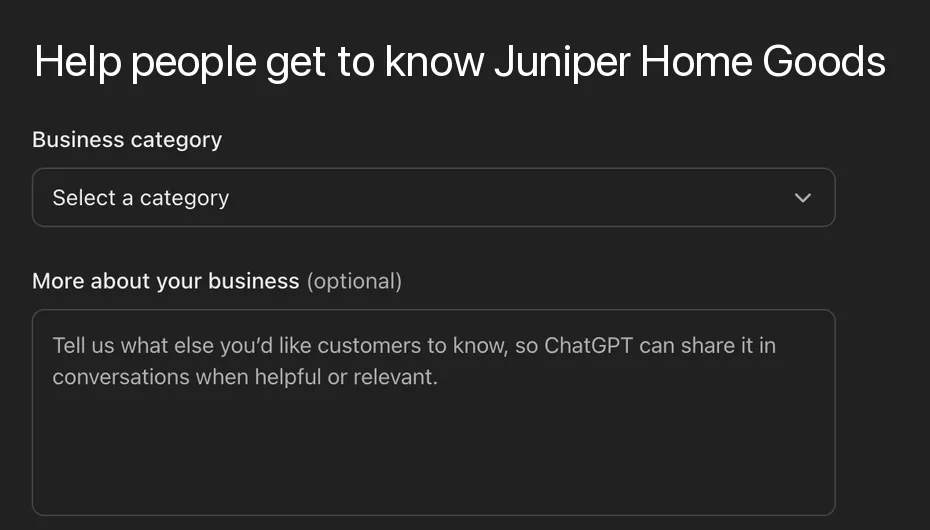
The category menu and the optional description box share one screen. -
Add a phone number and an email. Both are optional. Use the ones the website lists.
-
Set the delivery and return policies, then select Submit. Pick the options your policy page states.
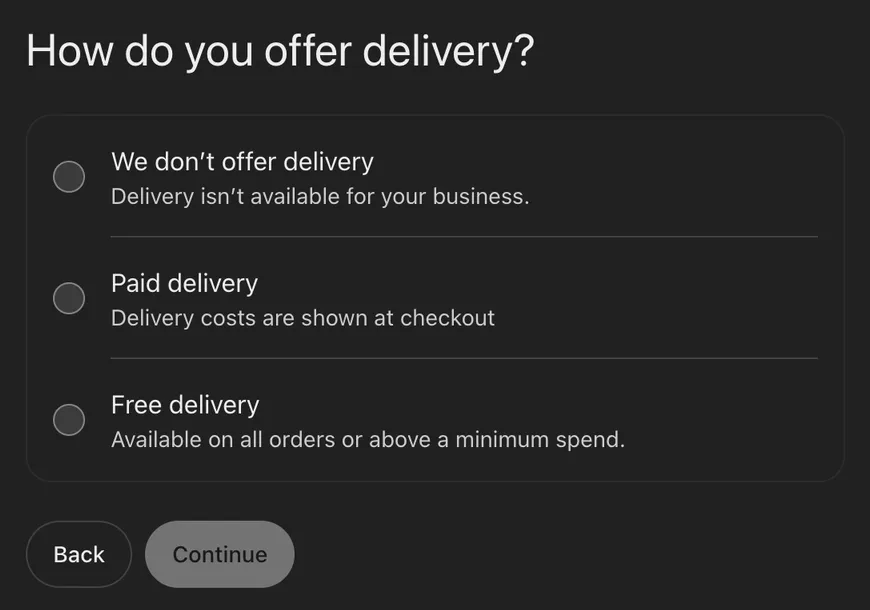
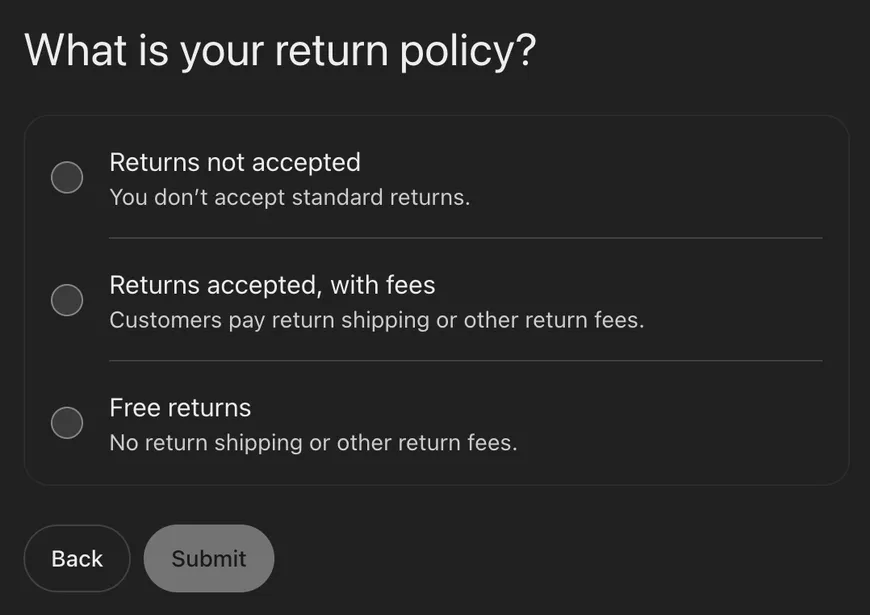
Free delivery covers all orders or orders above a minimum spend. The return policy screen ends with Submit.
OpenAI reviews a submitted profile before it goes live. Business Hub then asks for an identity check through Persona, an identity verification service. The Insights reports stay locked until that check is complete.
How do you add the ChatGPT TXT record in Cloudflare?
You add the ChatGPT TXT record in Cloudflare from the domain’s DNS records page (Cloudflare’s guide to creating DNS records). ChatGPT gives you a host that starts with openai-business-profile and a value that starts with openai-business-profile=.
- Open the domain in the Cloudflare dashboard and go to the DNS records page.
- Select Add record and choose TXT as the type.
- Type
openai-business-profilein the Name field. Cloudflare adds the domain itself (Cloudflare’s DNS record reference). - Paste the full value from ChatGPT into Content and select Save.
- Go back to ChatGPT and select the check button when it becomes active.
Other DNS providers use the same values. If the saved name reads openai-business-profile.example.com.example.com, delete the second example.com.
Local and service businesses wait to join ChatGPT
Physical locations and service businesses can’t complete a ChatGPT profile as of November 10, 2026. Choosing “At a physical location” puts the business on a waitlist, and ChatGPT emails when the profile can be continued. In the US, a local business can claim only a listing ChatGPT already has. “Through a service” is marked coming soon with no date.
The online store setup screens don’t ask for a store address or opening hours, though the later Persona identity check asks for the business’s registered address.
OpenAI’s business tools on a timeline
OpenAI’s business tools changed several times in 2026 before the Business Hub launch.
| Date | What changed |
|---|---|
| March 2026 | OpenAI retired its effort to sell products directly in ChatGPT, including a checkout cart feature (TechCrunch’s launch coverage). |
| September 2026 | OpenAI began testing Sponsored Agents. |
| November 6, 2026 | Search Engine Roundtable reported an early look at the business tools (Search Engine Roundtable’s early report). |
| November 10, 2026 | Businesses in ChatGPT launched in beta with Business Hub, Insights and Business Agents. |
Frequently asked questions
Is Businesses in ChatGPT the same as ChatGPT Business?
Businesses in ChatGPT is a separate product from ChatGPT Business. Businesses in ChatGPT is the business profile program OpenAI launched in beta on November 10, 2026. ChatGPT Business is OpenAI’s paid workplace plan for teams.
Will claiming my business help it show up more in ChatGPT?
Claiming a profile shouldn’t change how often a business appears in ChatGPT, OpenAI’s Benji Shomair told Digiday. He added that the details could help ChatGPT bring a business up in more relevant conversations.
How do I verify my business in ChatGPT without DNS access?
You can verify a business in ChatGPT without DNS access through a code sent to the business phone or email, or through a Shopify login. Business Hub shows only the methods that apply to the business.
What is the openai-business-profile TXT record?
The openai-business-profile TXT record is the DNS record ChatGPT uses to confirm you control a domain. Its host is openai-business-profile followed by the domain, and its value is a code from Business Hub that starts with openai-business-profile=.
Can I see the prompts where ChatGPT mentioned my business?
You can’t see the prompts behind a mention in Business Hub. OpenAI doesn’t share users’ conversations with businesses, so Business Hub shows mention counts and discovery topics.
Can a local business with an address join ChatGPT now?
A local business with an address goes on a waitlist when it chooses the physical location path, as of November 10, 2026. ChatGPT emails when the profile can be continued, and a business that also sells online can claim through the online store path.